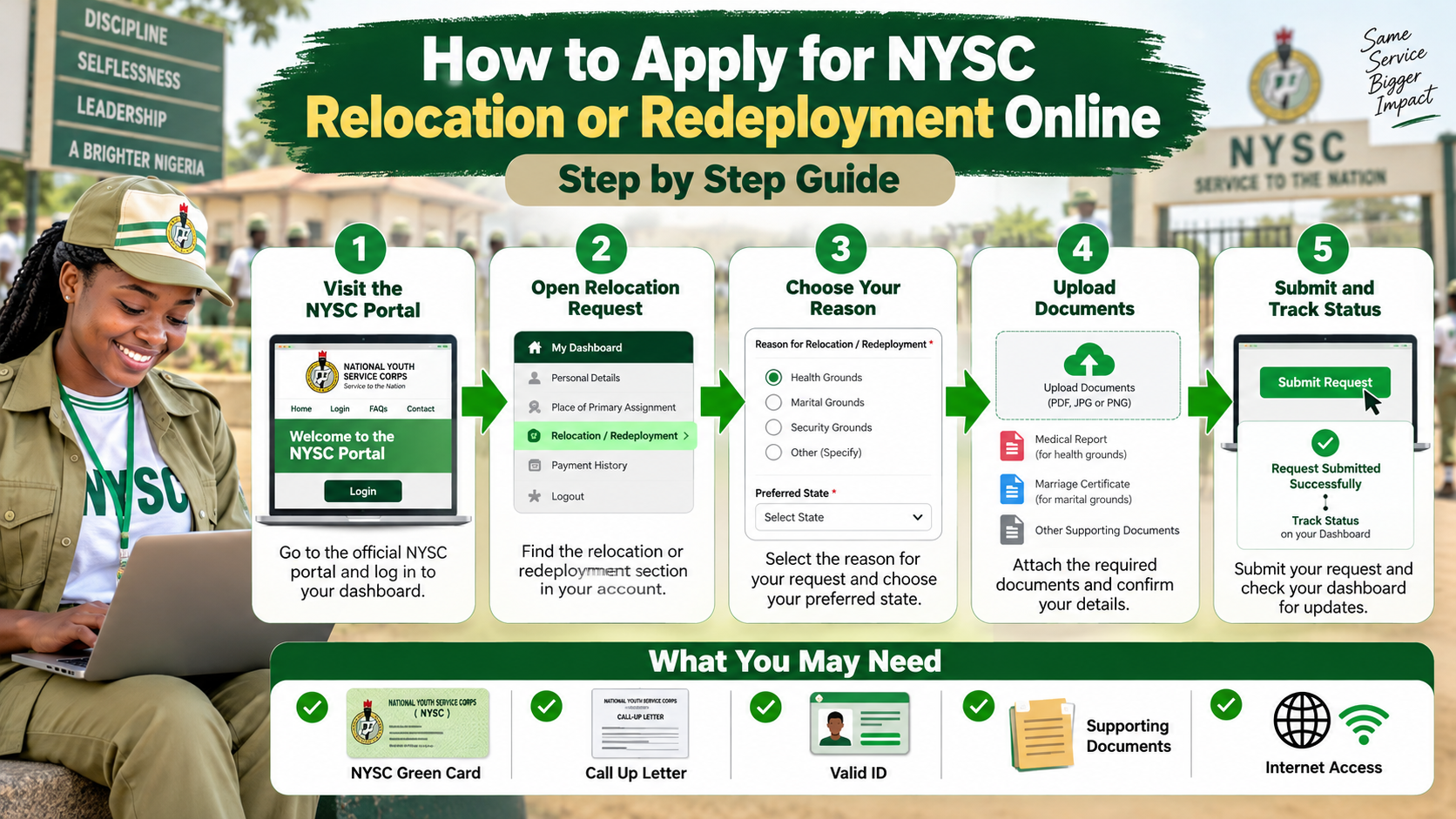
Relocation, also called redeployment, is the process through which a corps member requests a change from the state or location of deployment under circumstances recognized by NYSC.
Approval is not automatic. The process, supporting evidence and stage at which an application can be made depend on the reason for the request and current NYSC procedure.
Understand Your Reason for Relocation
Common relocation requests are connected with health, marital circumstances or other grounds recognized by NYSC. A genuine request should be supported by evidence that can be verified.
Apply Through the Recognized NYSC Process
Where an online relocation option is available on the corps member dashboard, log in through the official NYSC portal and follow the relocation instructions shown there.
Some relocation matters also involve camp officials, the state secretariat, the employer or another NYSC office. Follow the instruction that applies to your stage of service.
Prepare Supporting Documents
The exact documents depend on the reason for relocation. Medical applications may require credible medical evidence. Marital applications may require marriage and spouse residence evidence. Other cases should follow the documentation NYSC requests.
Track the Application
Keep checking your dashboard and official communication channels. If NYSC approves the request, follow the new reporting instructions carefully.
Do not leave your current place of service simply because you submitted an application. Continue to follow NYSC instructions until an official relocation decision is issued.
Avoid Relocation Scams
No private person can guarantee an NYSC relocation approval. Be cautious of anyone asking for payment in exchange for a promised state.
Follow the Official Decision
Relocation is an administrative process and each case is considered on its own evidence. Submit accurate documents and be patient while the request is reviewed.
If the portal does not show an option you expect, contact the appropriate NYSC office rather than creating multiple accounts or using an unofficial website.
Important: NYSC schedules, portal procedures, fees, allowances and document requirements can change. For 2027, confirm the latest information on the official NYSC website and portal before taking action.
Comments
0 approvedRegister for a student portal account or sign in if your account is already active. All comments are moderated before publication.
Register Student Login